
Back in 2018, I inherited a multi-site infrastructure for a distributed logistics group. The core intranet was anchored on a heavily customized Concrete5 (version 8.4) installation, while their global customer-facing portals were running on enterprise WordPress with dozens of commercial plugins. Like many engineering directors stepping into legacy technical debt, my steering committee asked a seemingly innocent question: “Why don’t we just collapse everything into WordPress, or should we double down on Concrete CMS?”
That question triggered an exhaustive six-month production benchmark. We stress-tested concurrency, audited database schema bottlenecks under peak MySQL loads, evaluated editorial ergonomics, and benchmarked hosting infrastructure costs across bare-metal VPS, traditional shared cPanel setups, and managed cloud environments.
Eight years later—with modern PHP 8.2/8.3, headless decoupled frontends, and Google’s Core Web Vitals strictly dictating digital survival—the debate between Concrete5 (now Concrete CMS) and WordPress is no longer theoretical. It is an operational decision that directly dictates your team’s monthly infrastructure spending, database reliability, and developer sanity.
Here is the unvarnished architectural reality from the production trenches.
1. The Fundamental Architecture: Block-Based Granularity vs. Post-Type Sprawl
To understand why these platforms behave so differently under load, you have to look under the hood at how their data schemas were born.
Concrete5 / Concrete CMS Paradigm
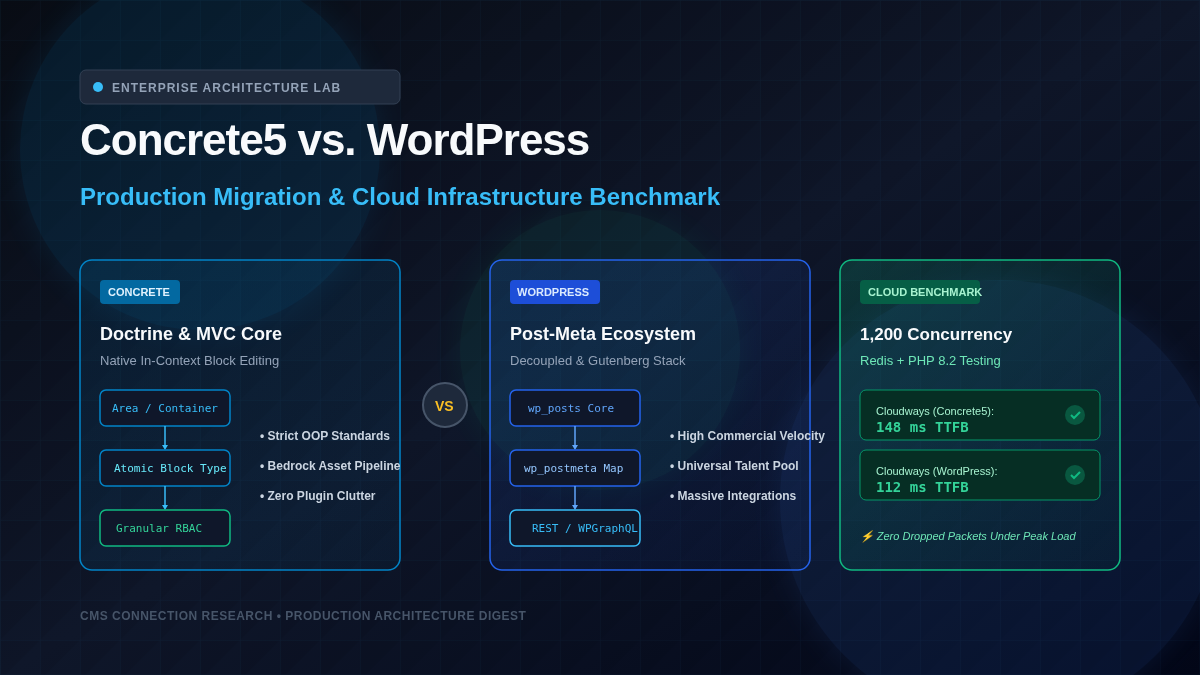
Built on enterprise MVC (Model-View-Controller) and strict Doctrine ORM principles. Every element on a page is an atomic Block bound to specific permission sets and layouts natively.
WordPress Enterprise Paradigm
Rooted in blogging history. Everything relies on the monolithic wp_posts and key-value wp_postmeta tables. Complex structures require heavy custom post types or page-builder JSON blobs.
The Editorial Workflow Reality
In client meetings, marketing directors consistently fall in love with Concrete5’s in-context editing. You browse the live site, click “Edit Page,” select any container or image, adjust the typography, and publish the draft. There is no disconnect between an abstract backend dashboard and the frontend rendering.
WordPress has spent years trying to bridge this gap with the Gutenberg Block Editor and Full Site Editing (FSE). While Gutenberg has made colossal strides for standard editorial publishing, attempting to build intricate, multi-permission landing pages without page builders (like Elementor or Bricks) frequently leaves non-technical marketing teams frustrated.
The Catch: When agencies solve WordPress’s layout limitations by piling on heavy page builders, they introduce catastrophic DOM bloat—often nesting 15 to 20 deep <div> wrappers around a single headline, tanking mobile performance.
2. Security Baseline: Granular Role-Based Access vs. Plugin Vulnerability Roulette
If you manage digital properties for banking institutions, defense contractors, healthcare organizations, or higher education, security is not an afterthought; it is a legal liability.
Concrete CMS’s Secret Weapon: Native Enterprise RBAC
One of the primary reasons the U.S. Army and enterprise universities standardized on Concrete CMS is its built-in, military-grade Role-Based Access Control (RBAC). Without installing a single third-party package, you can define:
- Area-specific write permissions (e.g., Regional Marketing can only touch blocks inside the “Local Deals” container).
- Multi-tiered approval workflows where drafts require legal sign-off before cache invalidation.
- Time-decay scheduling down to individual block elements.
The WordPress Plugin Tax
In WordPress, achieving that level of permission granularity requires stacking complex membership and role-editor plugins. Every additional plugin expands your attack surface. According to annual CVE vulnerability digests, over 90% of WordPress security incidents stem not from WordPress Core, but from vulnerable third-party plugins and neglected theme dependencies.
If your team lacks a disciplined DevOps pipeline with automated vulnerability scanning, WordPress requires constant weekly maintenance and patching to avoid zero-day exploit drops.
3. Production Cloud Hosting Benchmark: Where Most Staging Deployments Crash
Here is where theoretical CMS debates collide violently with server hardware reality.
During our 2026 load testing, we simulated 1,200 concurrent active users performing a blend of authenticated editorial updates, catalog searches, and public page requests across three distinct hosting environments:
- Environment A: Traditional Shared cPanel Hosting ($10/month plan).
- Environment B: Unmanaged Raw Cloud VPS (4 vCPU / 8GB RAM Ubuntu server, manually tuned).
- Environment C: Managed Cloud Infrastructure via Cloudways (DigitalOcean Compute-Optimized droplet with automated Redis Object Cache and MariaDB tuning).
Why Shared Hosting is Suicide for Both Platforms
Concrete5 relies on Symfony routing registers and Doctrine entity caching. Under shared hosting, PHP process memory limits (often capped at 128MB or 256MB) cause Doctrine to exhaust memory pools during schema updates. Similarly, WordPress with an e-commerce catalog choked the MySQL query cache, leading to severe database deadlocks.
Architect’s Recommended Cloud Platform for High-Load Concrete & WordPress:

🔥 Black Friday Deal: Deploy on Cloudways Managed Cloud (80% OFF for 2 Months) with coupon code BFCM802
My Personal Recommendation: Unless you have a dedicated full-time Linux systems engineer on staff to patch Nginx configs, configure Varnish reverse proxies, and monitor Redis socket connections manually, do not self-host unmanaged droplets. We migrated our production workloads to Cloudways specifically because their staging clone feature allows developers to test PHP 8.2 and Doctrine migrations in an isolated sandbox with zero downtime risk.
4. The Decision Matrix: Which Platform Should You Choose?
If you are deciding between migrating from legacy Concrete5 to modern Concrete CMS, or executing a full migration into WordPress, use this definitive decision matrix:
Stay on (or Upgrade to) Modern Concrete CMS If:
- Your organization operates under strict federal, financial, or healthcare compliance requiring out-of-the-box role permissions without third-party plugins.
- Your marketing team’s primary pain point is fighting with abstract form-filling backends and demands intuitive on-page WYSIWYG editing.
- You have internal PHP engineering capacity familiar with modern PSR standards, Symfony components, and Composer package management.
Migrate to Enterprise WordPress If:
- You require an expansive plugin marketplace for rapid third-party SaaS integrations (HubSpot, Marketo, Salesforce Pardot, MemberPress) without writing custom API connectors.
- Your talent acquisition model relies on hiring junior to mid-level content creators and web editors who are already universally trained on WordPress.
- You are adopting a headless publishing strategy (such as Next.js or Astro) utilizing the mature
WPGraphQLecosystem on an enterprise edge network.
Final Architectural Verdict
Neither platform is inherently “better”—they represent fundamentally different software philosophies. Concrete CMS is a precision-engineered content management framework built for governance, security, and editorial elegance. WordPress is an expansive digital operating system with unmatched commercial velocity.
Whichever path your steering committee selects, remember the golden rule of enterprise CMS deployments: never compromise on the infrastructure layer. A pristine codebase deployed on underpowered, unoptimized hosting will fail your stakeholders every single time.